Complete Guide to r36 max: Everything You Need to Know
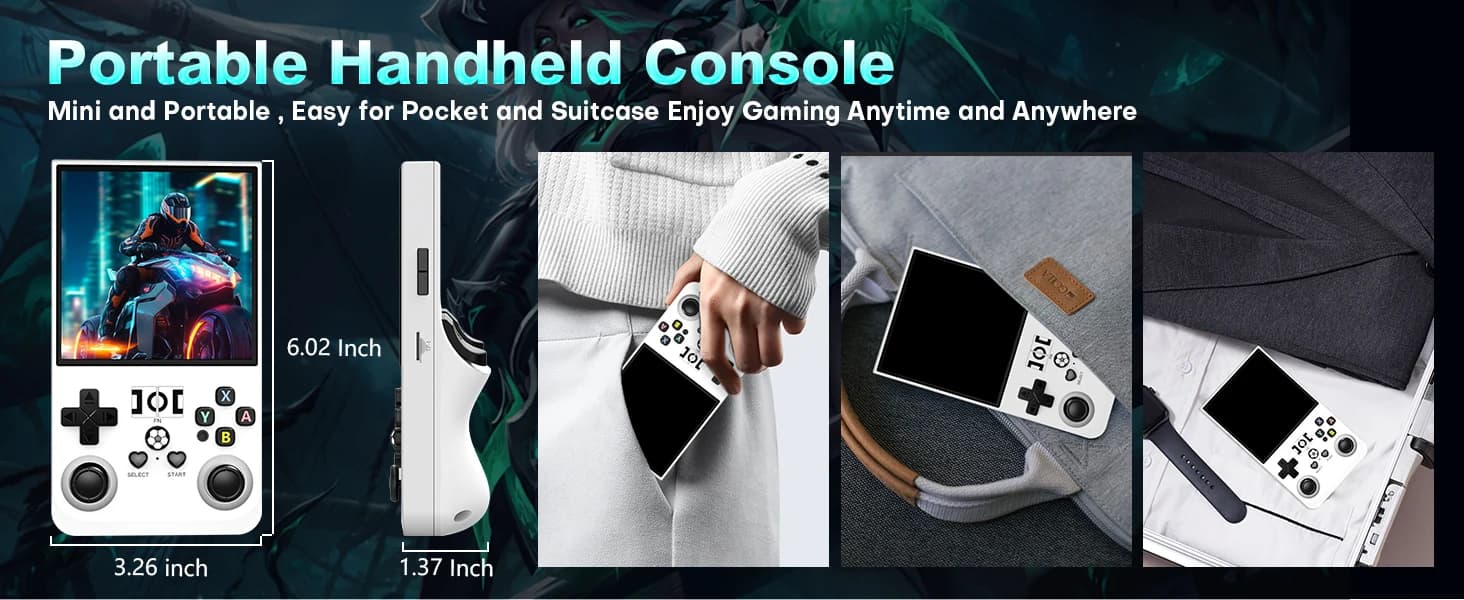
The R36S Max is a powerful retro gaming handheld console that brings thousands of classic games to your fingertips. Whether you're a seasoned retro gaming enthusiast or new to classic games, this comprehensive guide will help you understand everything about the R36S Max and how to get the most out of your console.
Getting Started with R36S Max
When you first receive your R36S Max, the setup process is remarkably simple. The console comes pre-loaded with thousands of games, so you can start playing immediately after charging. Begin by charging the device using the included USB-C cable. While charging, familiarize yourself with the console's physical controls and layout.
Once charged, power on your R36S Max and you'll be greeted by an intuitive user interface. The main menu displays your game library, organized by gaming system. You can navigate using the D-pad or analog stick, and select games with the action buttons. The interface is designed to be user-friendly, requiring no technical knowledge to operate.
Understanding the Game Library
The R36S Max comes with an extensive pre-installed game library covering over 20 different gaming systems. This includes classics from the NES era, 16-bit masterpieces from SNES and Sega Genesis, 32-bit adventures from PlayStation, and even more recent titles from PSP and Dreamcast. Each system has its own section in the menu, making it easy to find games from your favorite era.
The game library includes both iconic titles and hidden gems. You'll find games like Super Mario Bros., The Legend of Zelda, Sonic the Hedgehog, Final Fantasy, and many more. The variety ensures that there's something for every type of gamer, from action platformers to RPGs to puzzle games.
Essential Features and Functions
The R36S Max includes several essential features that enhance your gaming experience. Save states allow you to save your progress at any point in any game, which is invaluable for challenging titles or when you need to pause. You can create multiple save states per game, giving you flexibility in managing your progress.
Fast-forward functionality is another useful feature of the R36S Max. This allows you to speed through slow sections of games, such as lengthy dialogue or repetitive grinding sequences. The rewind feature lets you undo mistakes, which is particularly helpful for precision platformers or games with difficult timing requirements.
Customizable controls are a key feature of the R36S Max. You can remap buttons for each game individually, ensuring optimal playability. This is especially useful for games with unique control schemes or for players who prefer specific button layouts.
Display and Visual Settings
The R36S Max features a stunning 3.5-inch IPS display that delivers exceptional visual quality. You can customize the display settings to suit your preferences. Various filters and shaders are available that can enhance the visual presentation of classic games, from pixel-perfect rendering to smooth scaling options.
Adjusting brightness and contrast can help optimize battery life while maintaining visual quality. The R36S Max includes power-saving modes that reduce display brightness automatically, extending battery life during extended play sessions.
Battery Management Tips
To maximize battery life on your R36S Max, consider adjusting display brightness to a comfortable level rather than maximum. Lower brightness settings can significantly extend battery life. The console also includes power-saving modes that automatically reduce power consumption when not actively playing.
Charging your R36S Max is straightforward. Use the included USB-C cable with any compatible power adapter. The console charges relatively quickly, and you can continue playing while charging if needed. For best results, use a quality power adapter that provides adequate current.
Adding Custom Games
While the R36S Max comes with an extensive pre-installed library, you can also add your own games. The console supports custom ROM loading via microSD card. Simply copy ROM files to the appropriate folders on the SD card, and they'll appear in your game library. This feature gives you virtually unlimited storage capacity for your game collection.
When adding custom games, ensure you're using ROM files that you legally own. TheR36S Max supports ROMs for all the systems it emulates, making it easy to expand your collection with your favorite titles.
Troubleshooting Common Issues
If you encounter issues with your R36S Max, there are several troubleshooting steps you can try. If games aren't loading properly, ensure your ROM files are compatible and properly formatted. If the console becomes unresponsive, try holding the power button for several seconds to force a restart.
For performance issues, check if software updates are available. The manufacturer regularly releases updates that improve performance and compatibility. You can check for updates through the console's settings menu.
Advanced Tips and Tricks
Advanced users can take advantage of additional features in the R36S Max. The console supports various emulation settings that can be adjusted for optimal performance with specific games. Experimenting with these settings can improve compatibility and performance for challenging titles.
Creating custom playlists is another advanced feature. You can organize your favorite games into custom collections, making it easier to find and play the games you love most. This is particularly useful if you have a large game library.
Community Resources
The R36S Max has a vibrant community of users who share tips, configurations, and game recommendations. Joining online forums and communities can enhance your experience and help you discover new games and features. For additional resources and community support, visit r36s.com.au, r36shandheld.com, and r36h.com. These sites offer comprehensive guides, community discussions, and support for R36S products.
Purchase Your r36 max
Ready to start your retro gaming journey? Get your r36 max console from our trusted retailers:
R36S Australia Store
Fast shipping and local support for Australian customers.
Buy from R36S Australia →Conclusion
The R36S Max is a powerful and versatile retro gaming handheld that offers an exceptional gaming experience. With its extensive game library, premium build quality, and user-friendly interface, it's the perfect choice for retro gaming enthusiasts. By following this guide and exploring the console's features, you'll be able to get the most out of your R36S Max and enjoy countless hours of classic gaming.